Last updated: October 31, 2026
The best ScreenZen alternative for iPhone, if you only want Reels and Shorts gone, is Scroll Less. It blocks Reels and Shorts inside the real Instagram and YouTube apps, with your existing accounts and no lookalike app. Your Instagram DMs keep working, and so do regular YouTube videos, search and subscriptions.
In our Oct 31, 2026 hands-on test (ScreenZen 4.0.0, iOS 26.6.2), Reels and Shorts still played in the real Instagram and YouTube apps with ScreenZen set up; Scroll Less blocked them while DMs, search and regular videos kept working.
You’ve probably been here. ScreenZen asks you to breathe before Instagram opens. You breathe. You wait. You tap “open” anyway, because your friend sent you something. Two minutes later you’re watching a stranger pressure-wash a driveway. (Very satisfying. Not what you came for.)
The pause did its job. The problem is what was waiting on the other side of it.
ScreenZen alternative: the short answer
ScreenZen works on the whole app: a delay before it opens, limits on how long you use it, and blocks when you go over.
Scroll Less works on the feed inside the app. Instagram and YouTube open like normal, and Reels and Shorts are blocked. So there’s nothing to negotiate with every time you need to answer a DM.
If your problem is “I need Instagram and YouTube, I just lose hours to Reels and Shorts,” that’s the whole decision.
What ScreenZen does
Going by its App Store listing, ScreenZen gives you a bunch of ways to slow down:
- A delay before opening the apps you pick, and the wait can grow each time you open them.
- Interruptions while you scroll, so you only check apps for short stretches.
- Daily app goals, with an optional block once you hit them.
- Strict blocks by time range or number of opens, plus locks on its own settings.
That’s a solid toolkit if you want less of an app overall. In the real Instagram app, though, it doesn’t separate the DMs from the Reels. They’re in the same app, so they get the same treatment.
Scroll Less vs ScreenZen
| Scroll Less | ScreenZen | iPhone Screen Time | |
|---|---|---|---|
| What it acts on | Reels and Shorts inside the Instagram and YouTube apps | Whole apps you choose | Whole apps and app categories |
| How it slows you down | Blocks full-screen Reels and Shorts | Delay before opening, scroll interruptions, app goals, strict blocks | Daily time limits and schedules |
| Instagram DMs during a block | Keep working | Limited along with the whole app | Limited along with the app |
| Regular YouTube videos and search | Keep working; Shorts blocked in the Shorts tab, and on Home and in search when tapped | Limited along with the whole app | Limited along with the app |
| Blocks only Reels/Shorts? | Yes | Not in the real apps (its Minimal mode drops the Reels and Shorts tabs inside ScreenZen) | No |
| Best for | Keeping the real apps, minus Reels and Shorts | A pause before opening distracting apps | Simple built-in daily limits |
ScreenZen vs Scroll Less: hands-on test
We put both apps on the same iPhone and tried the same five things: open Reels, open Shorts, use Instagram DMs, search Instagram and watch a regular YouTube video. (Tested Oct 31, 2026, with ScreenZen 4.0.0 on iOS 26.6.2. Apps update, so think of this as a snapshot.)
Tested by the Scroll Less team on October 31, 2026.
Here’s the short version. ScreenZen’s way around Reels and Shorts is its “Minimal Instagram and YouTube” mode: stripped-down versions of both that run inside ScreenZen. In the real Instagram and YouTube apps, Reels and Shorts were still there. Scroll Less blocked them inside the real apps.
| Scroll Less | ScreenZen in the real apps | ScreenZen Minimal mode (runs inside ScreenZen) | |
|---|---|---|---|
| Where you use Instagram and YouTube | The real apps | The real apps | Stripped-down versions that run inside ScreenZen |
| Reels in Instagram | Blocked (“Reels are blocked”) | Reachable; limits cover the whole app | No Reels tab |
| Shorts in YouTube | Blocked (“Shorts are blocked”) | Reachable; limits cover the whole app | No Shorts tab (just Home and You) |
| Instagram DMs | Work | Work, under the whole-app rule | DMs tab is there |
| Instagram search | Works | Works, under the whole-app rule | Search tab is there |
| Regular YouTube videos | Play | Play, under the whole-app rule | Search bar is there (we didn’t test playback) |
A few notes from the test:
- In the real apps, ScreenZen’s controls cover the whole app: a pause before it opens, a daily time limit, a cap on opens per day, or a full block. Our Instagram rule was a 5-second pause, 10 minutes per open and 6 opens a day, then blocked. That rule counts against the DMs just as much as the Reels.
- Minimal mode does keep DMs and search while dropping the Reels and Shorts tabs. The catch is that you’re no longer using the Instagram or YouTube app. You’re using a pared-down version of each that runs inside ScreenZen.
- ScreenZen’s YouTube settings include a Hide Shorts switch. It only affects ScreenZen’s Minimal YouTube, not the YouTube app.
- With Scroll Less, tapping into Reels or Shorts brought up a “Reels are blocked” or “Shorts are blocked” screen. Back in the same apps, a DM thread opened with the message box ready, an Instagram search for “thanksgiving recipes” loaded and a regular YouTube video played. (It was about a leaky oil drain plug. Not thrilling, but not a Short either.)
- ScreenZen is good at what it’s built for, which is slowing you down before you open an app. If you’d rather keep the real apps and lose only the feeds, that’s the gap Scroll Less fills.
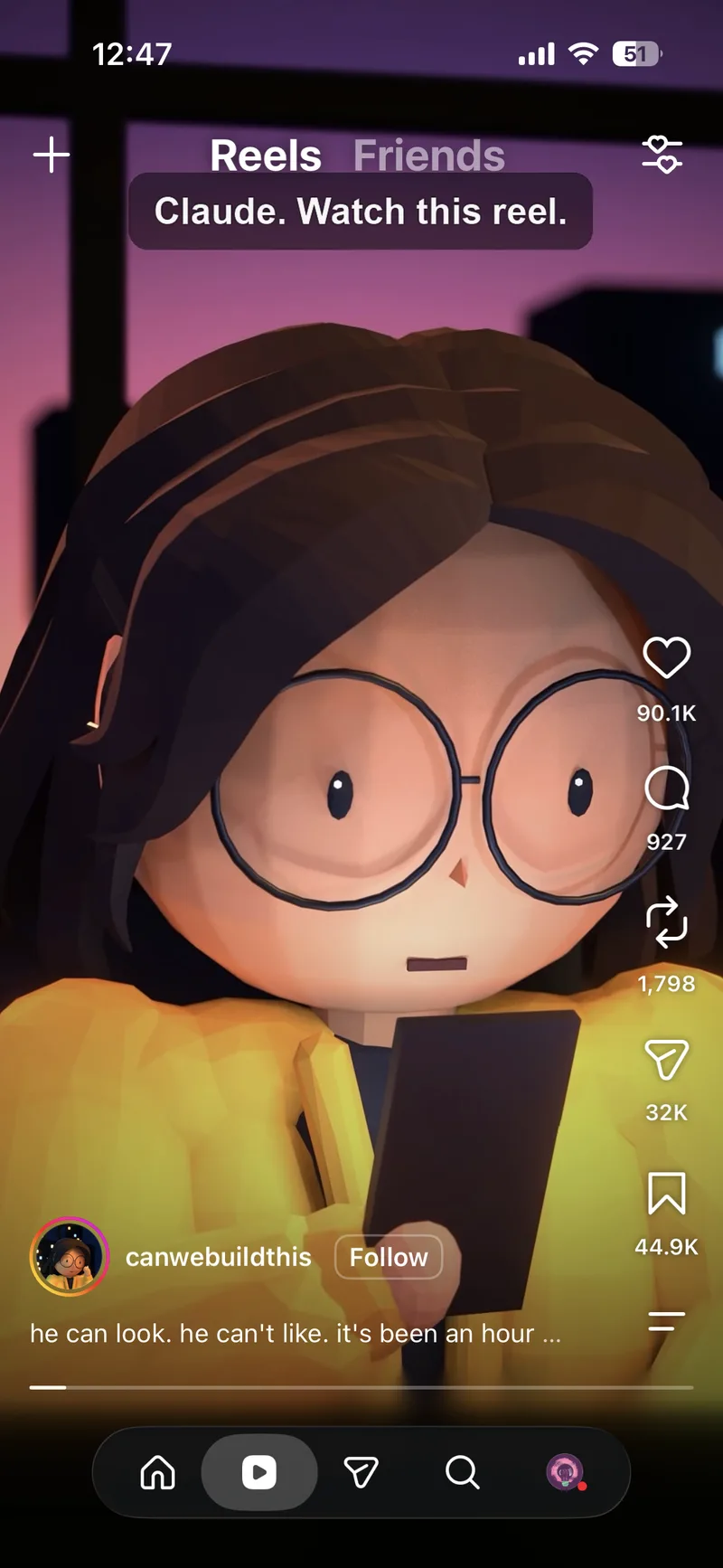 With ScreenZen set up, Reels still play in the real Instagram app.
 With ScreenZen set up, Shorts still play in the real YouTube app.
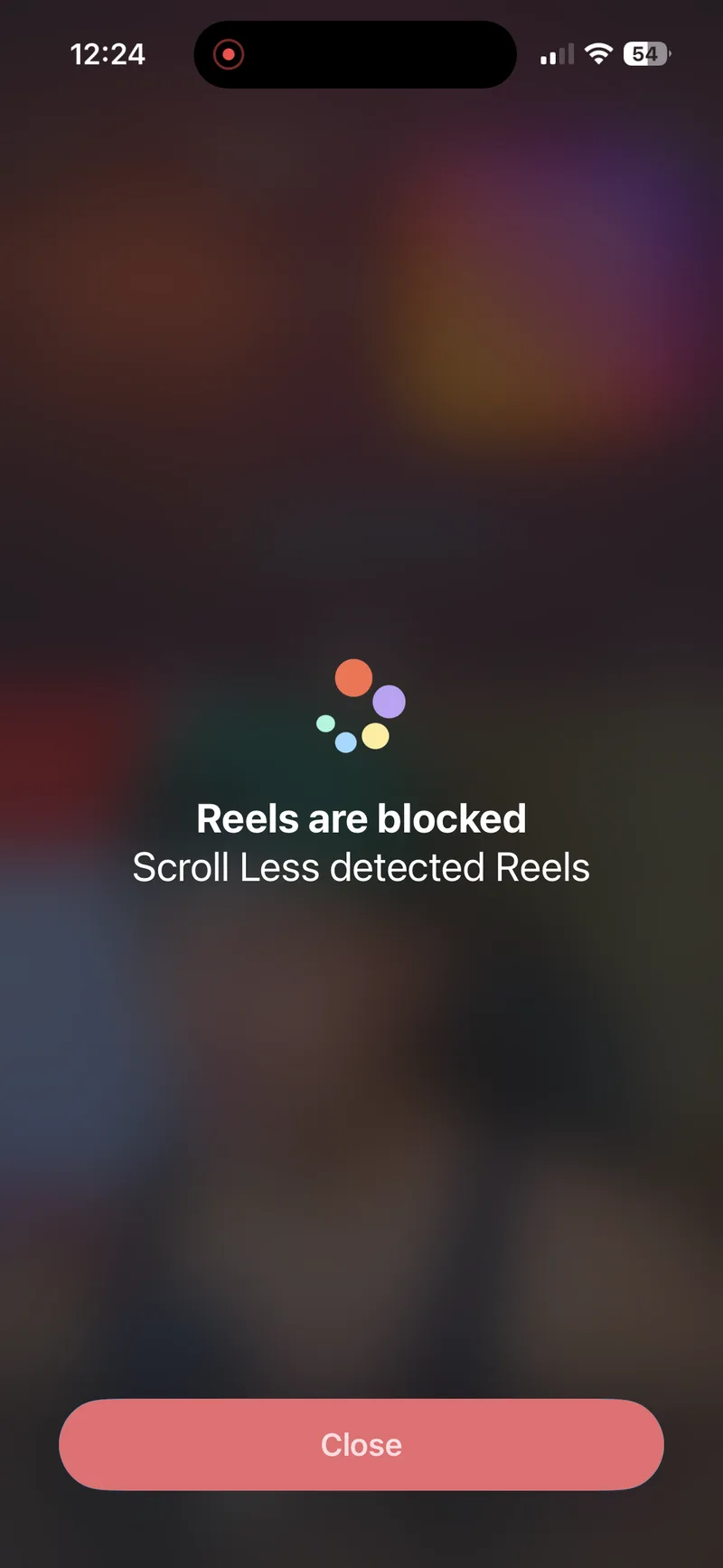 Scroll Less blocking Reels inside the real Instagram app.
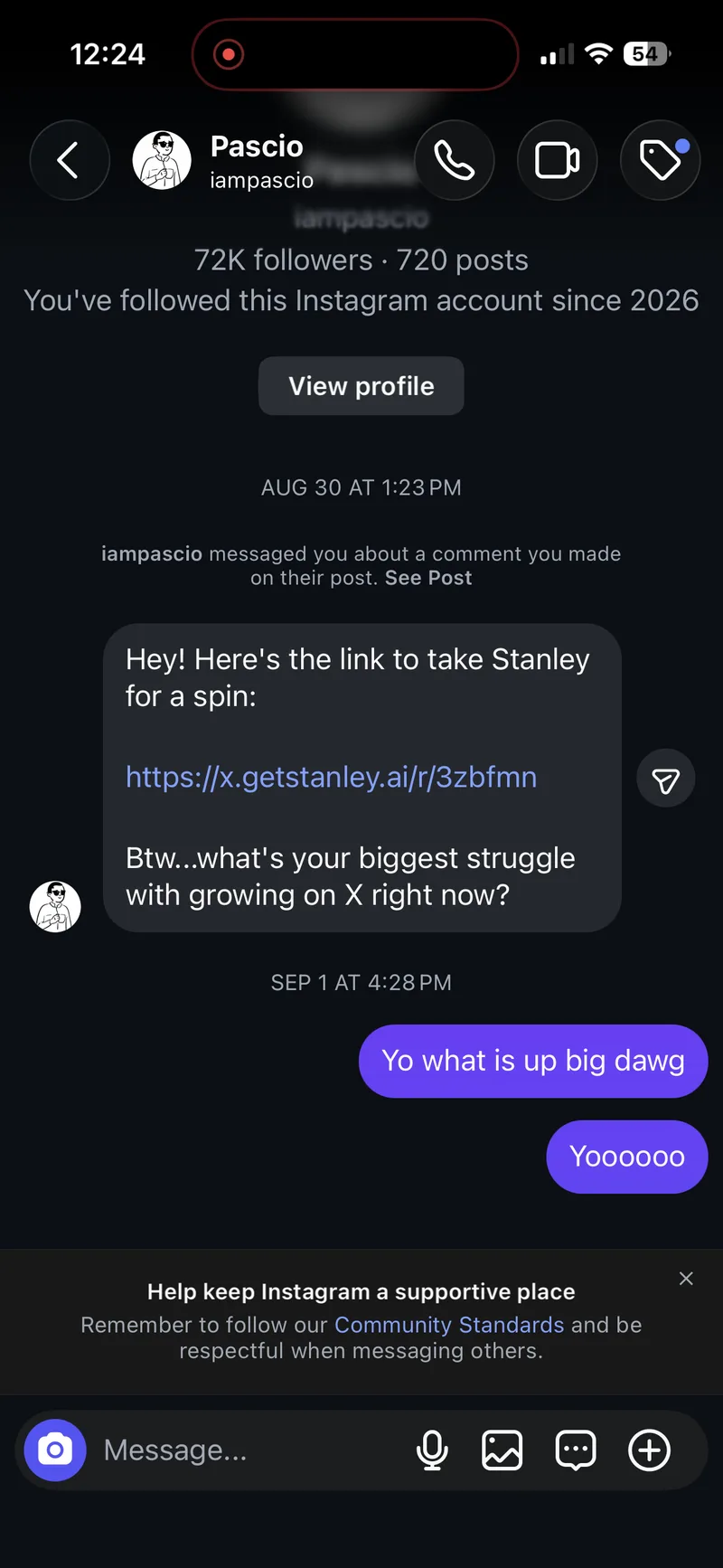 Same phone, same Instagram app: DMs still open normally.
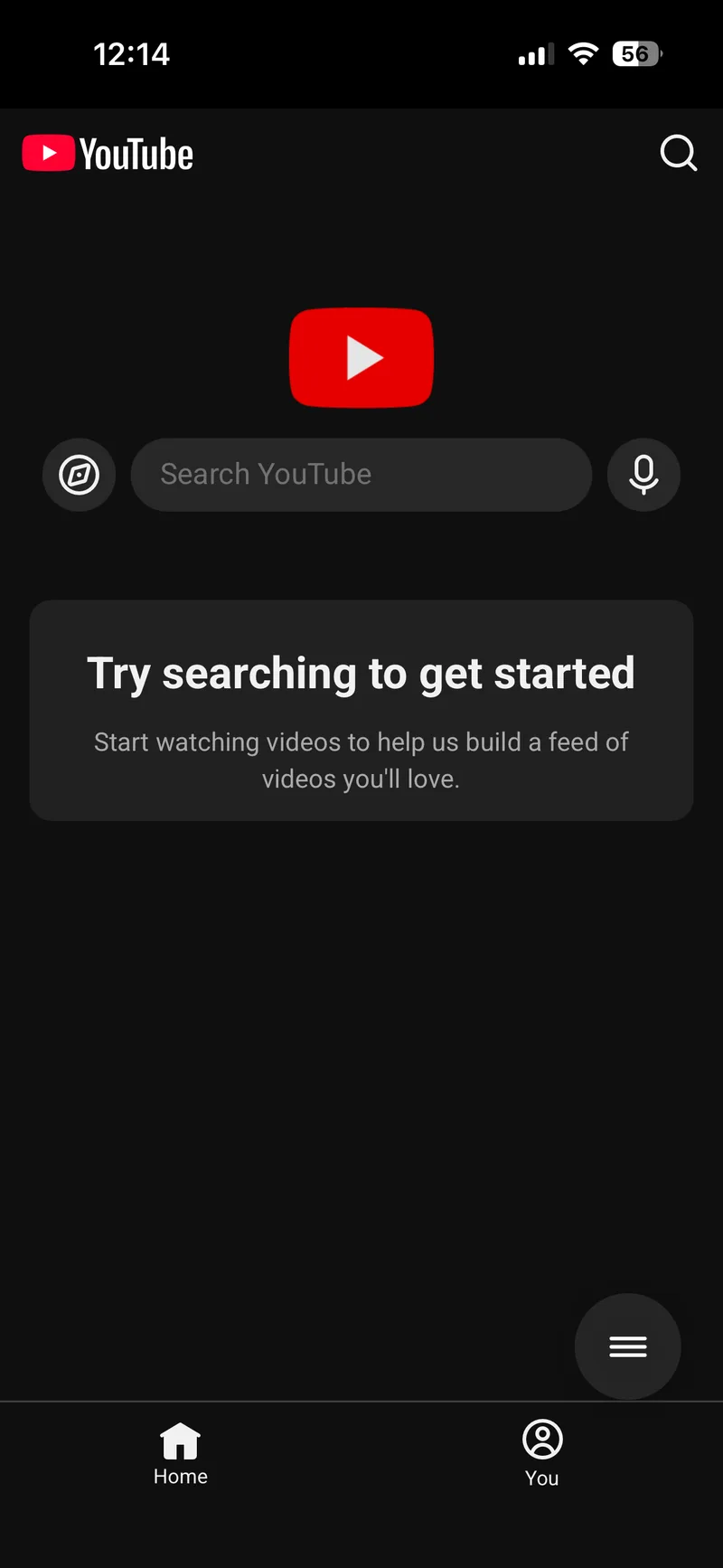 ScreenZen’s Minimal YouTube runs inside ScreenZen, with just Home and You tabs.
 ScreenZen’s Minimal Instagram: no Reels tab, but it isn’t the Instagram app.
Apps like ScreenZen
If you’re shopping around, two other names come up a lot:
- one sec adds a short pause before distracting apps open. Its listing says it delays apps instead of blocking them completely.
- Opal blocks the apps and websites you choose, with schedules, app limits and focus sessions.
Same family as ScreenZen: they work on the whole app. Here’s how all of them stack up in the full list of the best apps to block Reels and Shorts on iPhone. Coming from Opal specifically? Here’s the Opal alternative that only blocks Reels and Shorts.
Best for
- Scroll Less. Best for: keeping Instagram and YouTube, minus Reels and Shorts, with your DMs and regular videos untouched.
- ScreenZen. Best for: a pause before opening distracting apps, with limits that get stricter if you need them to.
- one sec. Best for: breaking the open-it-on-autopilot habit.
- Opal. Best for: scheduled focus sessions when you want whole apps gone for a while.
- iPhone Screen Time. Best for: basic daily limits without installing anything.
They also aren’t either/or. You could run a whole-app blocker during work hours and Scroll Less the rest of the day.
How to try Scroll Less
- Download Scroll Less from the App Store.
- Open it and follow the setup steps.
- Choose what to block (Reels, Shorts, or both), then start the Blocker.
- Go back to Instagram and YouTube and use them like normal.
For walkthroughs, see how to block Instagram Reels but keep your DMs and how to block YouTube Shorts on iPhone.
Frequently asked questions
What’s the best ScreenZen alternative for iPhone?
If you want to keep Instagram and YouTube and only lose Reels and Shorts, Scroll Less. It blocks them inside the real apps, and your Instagram DMs keep working.
Is there a ScreenZen alternative that keeps Instagram DMs working?
Yes. With Scroll Less, only full-screen Reels are blocked in Instagram. Your DMs keep working.
Does ScreenZen block only Reels or Shorts?
Not in the real Instagram and YouTube apps. In our Oct 31, 2026 test, ScreenZen’s controls there covered the whole app. Its Minimal mode leaves out the Reels and Shorts tabs, but it runs inside ScreenZen instead of the Instagram and YouTube apps.
Can iPhone Screen Time block just Reels?
No. Screen Time limits whole apps and app categories, so a limit on Instagram covers your DMs too.
Do I have to delete Instagram or YouTube?
No. You keep both apps and your existing accounts. Scroll Less blocks Reels and Shorts, and the rest stays.
Keep the app, lose the feed
A pause in front of Instagram still leaves Reels on the other side. Scroll Less takes Reels and Shorts out of the picture, so opening Instagram to answer a friend is just… answering a friend.